Self-Adaptive video resolution and aspect ratio to record Skype video calls

As we know by now, Skype will automatically adjust the video resolution and aspect ratio to the maximum depending on the available Internet connection and CPU capabilities on both sides of the conversation. For example, if you have an HD webcam, Skype will evaluate the above-mentioned conditions between the conversation.  If conditions are good enough you’ll get an HD video call using 720p & 16:9 .  If condtions aren’t good enough, you call will be in 480p or lower but definitely in 4:3. The recorded video images maybe get distortion if you always use the same aspect ratio.

So, we have released a new version that has added the new feature — Self-Adaptive video resolution and aspect ratio. This new feature will auto-detect your Skype video calls video resolution and aspect ratio, then record it use the same video resolution and aspect ratio automatically. This will avoid the video images distortion issue.  Now, the latest Evaer video recorder supported video resolutions are 240p, 360p, 480p, 720p, 1080p and the aspect ratio are 4:3,16:9.

Free download Evaer video recorder for Skype at http://www.evaer.com/download.htm



Purchase Evaer call recorder license from Skype Shop – Get 20% Off Now!

Get Evaer Call Recorder to record your Skype audio and video calls. 20% off now (Deadline 17/02/2013) from Skype Shop(http://shop.skype.com/apps/Call-recording-audio-video/Evaer-video-recorder-for-Skype.html).

20% off Evaer call recorder for Skype

20% off Evaer call recorder for Skype

Record Skype video calls in 1080p now!

In the most current release of Evaer, has supports recording Skype video calls in 1080p. By default, it use H.264 codec to compress video. H.264 is currently one of the most commonly used formats for the recording, compression, and distribution of high definition video. This is the same codec used by YouTube, DailyMotion, Hulu, Netflix and iTunes.

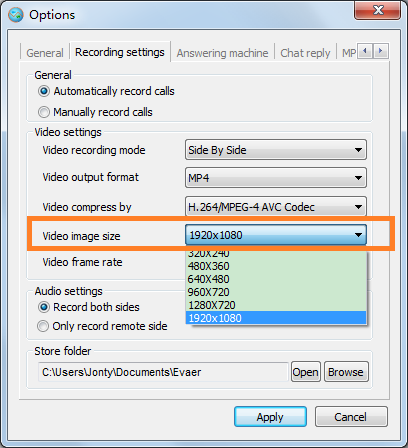
To record your Skype video calls in 1080p, you only need change the video image size option value to 1920×1080 as below picture.

record skype video calls in 1080p

record skype video calls in 1080p

Now! Free download/upgrade it at http://www.evaer.com/download.htm

Create MP4 or AVI movie files with new Evaer video recorder

With new Evaer Skype video recorder, you can record Skype video calls into MP4 or AVI movie files easily by click on Evaer “Menu > Tools > Options > Recording settings > Video output format” option.

Advantages of an MP4 file:-

  • MP4 helps by compressing data. It eliminates the long wait time needed to download a video.
  • It encodes raw data stream into compressed data, enabling the transfer of data into a video player when the video runs.
  • It compresses and encodes large audio or video files into small yet high quality file formats
  • It gives the video a quality similar to DVD while maintaining its size to a minimum level.

Free get it http://www.evaer.com/download.htm


Record skype voice call in stereo(two-channel) with Evaer skype call recorder new version

A few days ago we have released a new version with recording Skype sound in stereo (two channel) feature added.
By default, Evaer will record the Skype voice and video calls in stereo sound. You can disable the “Record sound in stereo” option at the Evaer “Menu > Tools > Options >Advanced” if you want to record Skype sound in mono.