Record Lync contacts audio and video calls from Skype 7.0

Skype just released the most recent version 7.0, Skype users can now video call their Skype contacts on Lync, and vice versa!    In the meantime, the latest Evaer 1.6.2.52 start support the latest Skype 7.0.  You are able to record the audio and video calls with Lync contacts now.  And the below video recording modes also support recording Lync video calls.

video recording mode for Skype video call recording

Record Skype video calls’ mode

Free download our Evaer Skype video call recorder at https://www.evaer.com/download.htm

Evaer Skype Video Recorder supports recording Skype video call in Picture In Picture mode now!

Evaer Skype Video Recorder released a new version with some enhancement. In the new released version 1.5.8.16, besides the exsiting recording modes, picture in picture mode is available. When you choose this recording mode, the Evaer skype video recorder will capture the local side video picture and put it in the remote video picture  , so when you review your skype recording files, you will see that you are in the remote picture.


Record Skype Video in PIP

Record Skype Video in PIP

You can setup the record mode quickly at the bottom of the Evaer main UI or the Evaer tools&options as below pictures:

video-mode

video-mode-tool

By default, the local picture size is setup to normal. If you feel the local side picture is with inadequate page size during you review the recording files, you can also customize it. Just go to Evaer–>Tools–>Options–>Recording Settings and setup the local image to a reasonable size as the following screenshot:

local-image-size

To record your skype video calls with the latest Evaer, please click here.

Evaer Skype Video Recorder supports multi-languages

New Evaer skype video recorder is available now,with this version multi-languages is supported. You can change the language at the Evaer–>Tools–>Language as the following screenshot:
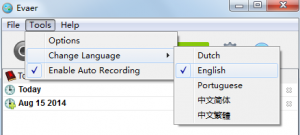
multi-languages

Currently we support five languages as the screenshot shown above. If you are interested in translating, you can also customize the language yourself with several steps below:

First, please go to Evaer installation path to find the ”lang” file, normally, it should be C:\Program Files\Evaer\Lang

Second,translate the language based on the english language template.

Third,when you finish the translation, upload the new language file to Evaer language package and the path is same with the step1.

After these steps, you just need restart the Evaer Skype recorder and then enjoy it.

We will be appreciated if you would like to share us the multi-language package, and our email is support@evaer.com



Skype Group Video Calling is now FREE – Record Skype Group Video Calls using Evaer

Skype announce that they are making group video calling free (group screen sharing also free) – for all users on these platforms. And, in the future, they’ll be enabling group video calling for all our users across more platforms – at no cost.

Free Skype group video calling

If you need to record your Skype group video calls, please download Evaer video call recorder for Skype at https://www.evaer.com/download.htm

It supports recording single Skype video calls, Skype screen sharing calls and up to 10 way Skype group video calls.